How to Search for a Part Number and Confirm It Is Real
A Good-Ark part search returns a pointer, and a result is not the thing it points at. Three searches that work, and what to do when nothing matches.
Updated: November 11, 2026
Searching for a part number is not the same as searching for information. The goal is to reach a document issued by whoever made the part, and most search results are not that. Knowing which result types exist and what each can tell you turns a frustrating search into a two-minute routine.
Updated after a US/EN SERP and competitor-page review: the sections below close selection gaps without replacing the original explanation. Topic hub: What are discrete power devices · research query: how to search confirm electronic part number.
Start with what is printed on the part
The single most effective habit is to search the string printed on the component rather than the string printed on the invoice. Invoices abbreviate, listings truncate, and search engines normalise, and all three can change a valid orderable number into one that does not exist. What is on the package is what a stock system, a quality inspection and a warranty claim will all be measured against.
Note the whole thing, including any suffix, the manufacturer mark and any date or lot code. Then photograph the part under good light, because a faded code is often readable in a photograph when it is not readable by eye.
Three searches that work
First, search the complete part number in quotes. If it is a valid orderable number, the results will include the manufacturer’s own product page and datasheets that carry it. If the quoted search returns marketplaces and nothing else, the number is probably a listing’s invention rather than a manufacturer’s identifier.
Second, search the part number together with the word datasheet and the package type. That combination filters out shop pages and catalogue listings, which rarely mention package names in a way that matches.
Third, if the number is short or ambiguous, search it together with the manufacturer mark and the package dimensions. A two-letter code is defined by each manufacturer separately, so adding a dimension or a distinctive feature narrows the candidates before you spend time on them.
Telling a datasheet page from a shop page
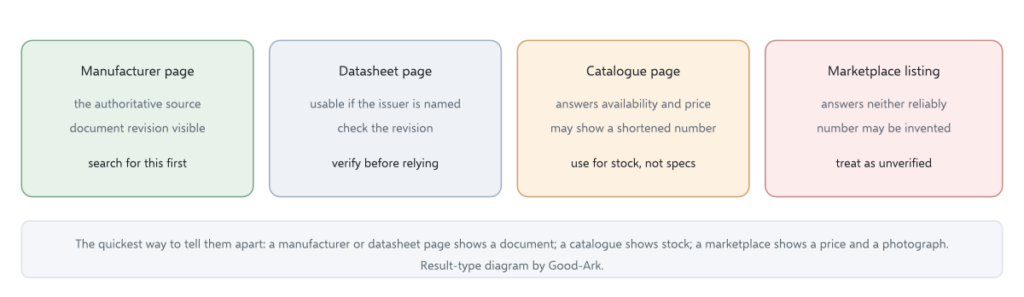
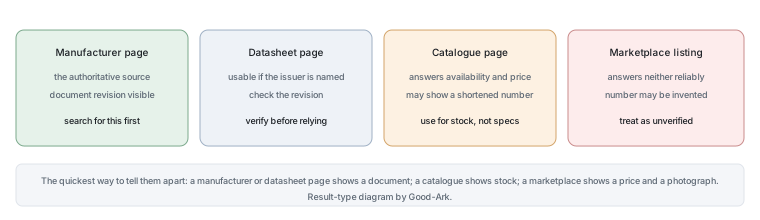
Three signals separate them quickly. A datasheet page shows tables with conditions and often a revision date; a shop page shows a price, a stock quantity and a buy button. A datasheet page names the issuing manufacturer prominently; a shop page names its own business. And a datasheet page usually carries structure — headings, a package drawing, an ordering table — while a shop page carries a form.
Where the distinction matters is that a shop page can contain a shortened part number. Distributors often list a base number and a package in separate fields, and copying the shortened version into a search produces a different result set from the one the manufacturer uses.
Using a distributor search properly
Distributor search is good at three things: showing whether a part is in stock, showing its package options, and linking to the manufacturer’s document. It is not good at telling you whether the part suits your circuit, because that requires your circuit’s conditions rather than a filtered list.
Two habits make distributor search reliable. Search by the complete orderable number rather than by a family name, because family searches return every manufacturer’s similar parts. And check the document the catalogue links to rather than the specifications in the catalogue’s own summary, because summaries are often abbreviated and occasionally outdated.
When nothing matches
Three explanations are common, and they have different remedies. The number may be a shortened form of a longer orderable number, in which case the manufacturer’s family page will show the full variants. It may belong to a different family whose prefix you misread, which a marking comparison will reveal. Or the part may not be a manufacturer’s number at all, which happens with re-marked components and with listings written by sellers rather than by manufacturers.
If the number cannot be matched after those checks, the honest conclusion is that the part is unidentified. That is a usable conclusion: it tells you to characterise the part on a bench and treat it as unknown stock, rather than to choose a replacement based on a guess.
One more distinction is worth carrying through the workflow. A search result is not evidence, and a document is not a specification unless it names its issuer. Keeping those two statements in mind explains why this routine spends so much effort on provenance rather than on finding pages: the pages are easy, and the authority is what takes a moment longer.
| Result type | Can establish | Cannot establish |
|---|---|---|
| Manufacturer product page | The part’s identity, its family and its current documents | Whether a specific seller has genuine stock |
| Datasheet file | Guaranteed limits, if the issuing manufacturer is named | Whether the file is the newest revision, unless it carries one |
| Distributor catalogue | Availability, package options and a link to the document | Specifications, which should be read from the document |
| Marketplace listing | That someone is offering to sell something | Part identity, condition, traceability or specification |
| Forum or video | What somebody experienced, and where to look next | Anything that needs a document as its source |
Building a small personal part library
The practical antidote to unidentifiable parts is to keep the documents for the parts you actually use. A folder per part number, holding the current datasheet, the ordering information page and a note of where and when you bought it, answers most future questions in seconds and makes substitution decisions straightforward.
Two rules keep that library useful. Re-download the datasheet when you place a new order, so the revision tracks the parts. And record the orderable number with its suffix rather than the family name, because the suffix is what distinguishes a footprint and a grade.
It is worth distinguishing two failures that look alike. A search that returns nothing useful usually means the number is not a manufacturer’s identifier. A search that returns plenty and none of it authoritative usually means the number is real but the search terms are pulling in commerce rather than documentation, which the package-type refinement fixes. Treating those two as the same problem is why people spend twenty minutes rerunning a search that was never going to work.
There is also a version of this problem that has nothing to do with search engines. A part you bought in a mixed assortment may carry a code that never existed outside the seller’s own warehouse, which is why an unidentified part from a bulk bag is better treated as characterised than as identified. The measurement takes ten minutes and produces something you can act on, whereas the search may never converge.
Workflow summary
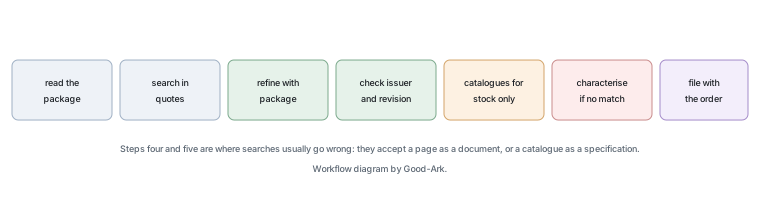
- Read the complete string from the package, including suffix and manufacturer mark.
- Search it in quotes; look for a manufacturer page or a datasheet.
- Add the word datasheet and the package type if the first search is noisy.
- Check that any document you find names its issuing manufacturer and carries a revision.
- Use distributor catalogues for stock and package options, not for specifications.
- If nothing matches, characterise the part rather than guessing at its identity.
- File the document with the order details.
Our own articles cover part numbers and datasheets. Component test methods come from JEDEC, marking and traceability expectations from IPC, document control requirements from ISO, and sector-level context from the Semiconductor Industry Association. Document and standards background is published by NIST and IEC.
What competing pages cover that this note now adds
After reviewing the current Google US results and the top competing guides, these practical gaps were the ones worth closing here—without replacing the original engineering narrative.
- Address the common competitor heading theme: [authorized channel insights](https://www.trustedparts.com/en/authorized-channel-insights).
- Address the common competitor heading theme: [ecia’s top 50 worldwide authorized distributors—2026 report](https://www.trustedparts.com/en/author.
- Address the common competitor heading theme: [ecia’s top 50 americas authorized distributors—2026](https://www.trustedparts.com/en/authorized-cha.
Quick selection checkpoints
| Check | Why it matters |
|---|---|
| Voltage / current headroom | Mission-profile peaks beat averages |
| Thermal path | Package + PCB decide Tj |
| Datasheet revision | PCN can move soft parameters |
| Second source plan | Line-down risk |
Specs to verify on the official datasheet
Treat catalog marketing pages as orientation only. Before release, pull the current datasheet revision and confirm absolute maximums, thermal resistance, and pulse ratings for the exact MPN.
- Confirm VRRM/VDS, IO/ID, and package Rth against your worst-case mission profile.
- Check recovery or Qg curves at your temperature—not only 25 °C headline numbers.
- Prefer authorized-channel docs; if a parameter is missing, do not invent it from a competitor page.
Good-Ark discrete catalog entry point: en.goodark.com — match the blog topic to the live product family page before quoting package options.
FAQ
Why does my part number return only shopping results?
Because search engines rank by relevance to commerce as well as to information, and a number that appears mostly on listings will return mostly listings. The fix is to search the number with the word datasheet and the package type, which filters out most catalogue pages. If the filtered search still returns nothing authoritative, the number may be a seller’s invention rather than a manufacturer’s identifier.
Is a distributor catalogue page reliable for specifications?
It is reliable for stock, price, package options and the link to the manufacturer’s document. Its own summary of specifications may be abbreviated or partly outdated, and catalogue part numbers are sometimes shortened relative to the manufacturer’s orderable number. Use it to find the document, and use the document to decide.
What should I do if I cannot identify a part at all?
Treat it as unidentified and characterise it: measure the package dimensions, measure forward voltage in both directions, and if you have the equipment, establish where it starts to conduct in reverse. That gives you a working envelope to reason about, which is more useful than a guessed part number. Do not fit an unidentified part into anything where an error has consequences.
How do I avoid buying a wrong part when the number looks similar?
Match the complete orderable number including the suffix, and check the package drawing against the footprint on your board. Two parts that share a base number can differ in package, grade or packing, and those differences change the footprint, the thermal path and the price. The suffix is not decoration.
Where should I keep the documents I collect?
With the order, not in a general downloads folder. A file named after the part number, stored beside the purchase record, is the version that will answer a question two years later when a substitute is needed and nobody remembers why the original was chosen.
What to do next
Pick a part you have used recently and run the seven-step workflow on it, including filing the document. The routine takes a couple of minutes the first time and seconds thereafter, and it turns a search that often fails into one that usually ends at the right page. The comparison method for deciding whether two parts are interchangeable is in our article on finding a replacement for a discontinued diode.
Send Good-Ark the complete number from the package and the package type, and we can confirm which entry it corresponds to and supply the documentation that applies.
Email sales@goodark.com, or start from the datasheet verification guide.
This article is published by Good-Ark, a manufacturer of discrete semiconductor devices. It describes search and verification practice rather than any specific part; the authoritative source for a component is its current official datasheet.
How to test electrical components with a multimeter?
Use the datasheet limits for your exact MPN and temperature; this page explains the selection logic, not a substitute rating.
What is the manufacturer part number?
Use the datasheet limits for your exact MPN and temperature; this page explains the selection logic, not a substitute rating.
What should I record before release?
Mission profile, MPN+rev, thermal estimate, and why the next alternate lost.
Datasheet or app note first?
Datasheet limits win; app notes explain method under their assumed board.
Continue through this engineering topic
For the complete selection, design, verification, and troubleshooting path, explore the Good-Ark Product and Sourcing Hub.
- Practical guide: Authorized Distributor vs Online Marketplace: What Is the Real Difference?
- Practical guide: Good-Ark Company History: Riding a Century of Electronics, From Radio Valves to Electric Cars
- Practical guide: What Does Good-Ark Electronics Actually Make? A Beginner’s Look at the Product Line
- Ask Good-Ark technical support about this application
Topic hub: What are discrete power devices — related selection guides and application notes in this cluster.