Good-Ark Datasheets: Finding Official Documents and Verifying What You Read
The difference between a useful datasheet and a dangerous one is provenance. A file with the right part number but the wrong…
The difference between a useful datasheet and a dangerous one is provenance. A file with the right part number but the wrong revision, or no issuing manufacturer at all, will look correct and lead to a wrong design decision. Establishing where a document came from takes about two minutes and is worth doing every time.
Why official documents matter
A datasheet is the manufacturer’s statement of what the part is guaranteed to do. That guarantee is only meaningful if the document is the manufacturer’s, if it is the current revision, and if it applies to the part number you are buying rather than to a relative of it.
Three specific failures follow from getting this wrong. A superseded revision may contain limits that have since been tightened, so a design checked against it may be outside the current specification. A copy from an unknown source may have been edited, or may have lost a page. And a document for a different variant of the same family may describe the right function with the wrong ratings. None of those announces itself; all of them are detectable by checking provenance.
Channels that publish original files
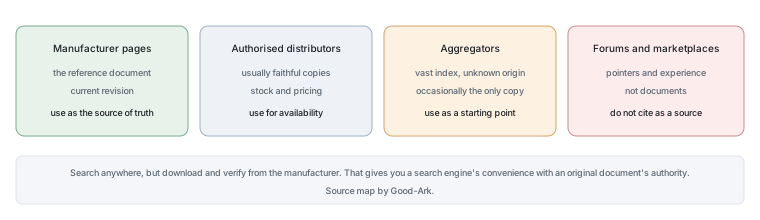
Four kinds of source publish documents, and they differ in authority. The manufacturer’s own product pages publish the original document, and they are the reference. Authorised distributors publish copies that are usually faithful, and they are convenient for stock and pricing. Datasheet aggregators index huge numbers of files from unknown origins, which makes them useful for finding a starting point and unreliable as a final source. And everything else — forums, file-sharing sites, marketplace listings — should be treated as a pointer rather than a document.
The practical sequence is therefore: search wherever you like, but download and verify from the manufacturer. That gives you the convenience of a search engine and the authority of the original.
How to check a PDF’s origin
Four checks, in order. Does the document name an issuing manufacturer on its first page? Is the part number on the first page the one you are looking for, including the suffix? Does the file carry a revision identifier and a date, usually in a footer or a header? And does the layout, logo and typography look like a manufacturer’s published template rather than a scan or a rebuilt page?
Two of those deserve emphasis. A document with no issuing manufacturer is not usable, whatever its contents, because nobody is accountable for it. And a document whose revision date cannot be found cannot be compared with another, which means you cannot tell whether you are reading the current limits or an older set.
Datasheet revisions and date codes
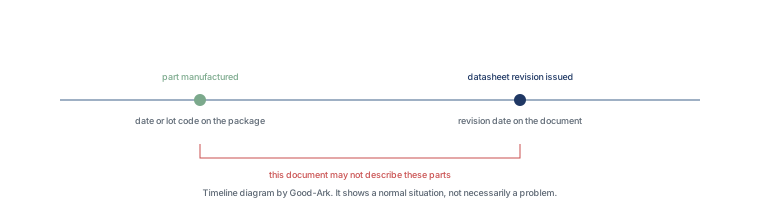
Two dates appear in this subject and they mean different things. The datasheet revision date tells you when the document was issued. The date or lot code printed on the part tells you when that specific unit was manufactured. Comparing them tells you something useful: if the part was made before the current datasheet revision was issued, then the part may have been produced under an earlier specification, and the document you are reading may not describe it.
That comparison is not a reason to reject the part. It is a reason to ask the supplier which revision applies to the batch, which is a normal question in a professional purchase and one that a serious supplier can answer.
When a translated copy is safe to use
Translations are common in this industry and are sometimes the only version available. A translation is usable for orientation and for finding your way around the document, and it is not usable as the source of a specification, because numerical values, symbols and units are exactly what translation tends to disturb. A dash becomes a minus, a tilde is lost, a subscript disappears, and a limit that should read “no less than” can end up reading “no more than”.
The safe practice is to use the translation to navigate and the original to decide, and if the original is genuinely unavailable, to ask the supplier for the relevant pages rather than to trust the translated figures.
There is one habit that makes all of this quicker over time. Save the document with a filename that includes the part number, the revision identifier and the date you downloaded it. Later, when two files with similar names sit on the same disk, the filename alone tells you which is current, and nobody has to open both.
What to do if the file is missing
If you cannot find a document, three things are worth trying in order. Search by the manufacturer’s part number rather than by the family name, because family names return other people’s products. Ask the supplier or the manufacturer directly, stating the complete orderable number and the package, which is a normal request and often produces a response in a day. And if the part is obsolete, look for the suggested replacement in the manufacturer’s own end-of-life notice rather than in a third-party cross-reference list.
What you should not do is design around a document you cannot identify. A specification without an issuing manufacturer is a claim rather than a source, and in a production context that difference is the whole point.
One comparison is worth making explicitly, because it explains why revision control matters in practice. The revision date belongs to the document; the date or lot code belongs to the part. A part made before the current revision was issued may have been produced under different limits, and the document in your hand may not describe it. That is not a defect and it is not unusual; it is a reason to ask the supplier which revision applies to a specific batch, which is a normal question in a professional purchase.
Cross-checking with the label on the part
Once you have a document you trust, check that the printing on the component matches its marking specification. That comparison catches three situations: a part from a different family whose code you misread, a re-marked part, and a genuine part from an older revision whose marking scheme has since changed.
It also confirms that the document you downloaded applies to the physical object in front of you rather than to a relative. Our article on reading component markings covers that comparison in detail.
| Check | Catches | Does not catch |
|---|---|---|
| Issuing manufacturer named | Documents of unknown origin | An edited copy that retains the name |
| Part number matches, including suffix | Documents for a relative variant | A part that was re-marked |
| Revision date present and recent | Designs checked against superseded limits | A document that was never current |
| Marking matches the datasheet | Misread codes and some re-marked parts | A convincing counterfeit |
| Channel and lot confirmation | Parts outside the authorised supply chain | Problems inside a legitimate chain |
The related reading on this site covers the documentation side: datasheets and the PDF format. Quality management requirements that govern document control come from ISO, component test methods from JEDEC, marking and traceability expectations in production from IPC, and sector-level context from the Semiconductor Industry Association. Document and standards background is published by NIST and IEC.
What to do when the listing and the datasheet disagree
When a distributor listing or an aggregator copy disagrees with the official datasheet, treat the official document as the source of truth and flag the discrepancy: the listing may be old, the revision may differ, or the copy may have been reformatted incorrectly.
Last updated:
The discrepancy is a verification event, not a mystery: download the official PDF from the product page, compare the revision and the values, and note which document the design will use. If the listing shows a different voltage class, current or package, the part number on the listing may not be the same part or the data may be stale. The design record should name the official revision and the check date, so an audit can trace the numbers. Distributor data is convenient for search and comparison; the official datasheet is the contract.
Building a datasheet verification habit
Build the habit into the design process: download the official PDF, record the revision and date, verify the design-critical parameters with their conditions, and re-check the revision before the BOM and before production release.
The datasheet is checked at three points in a design: when the part is selected, when the BOM is finalized and before production release. Each check confirms the revision is current and the numbers still fit the design. The habit is especially important for parts in long-life products, where a revision published during the design can change a parameter. The record of revision and check dates turns the datasheet from a downloaded file into a traceable design input. The component that reaches production with a verified current datasheet is the one whose numbers can be defended in a review.
| Check | What to confirm | When |
|---|---|---|
| Source | Official page or document library | First download |
| Part and revision | Number, code and date match | Selection and BOM |
| Design parameters | Values with test conditions | Selection and review |
| Currency | Revision still current | Before release |
Checklist
- Find the family on the manufacturer’s own product page, not in a search result.
- Confirm that the document names its issuing manufacturer.
- Match the complete part number, including the suffix.
- Find the revision identifier and date.
- Compare the datasheet revision date with the date code on your parts.
- Use a translation only to navigate; take values from the original.
- Check the marking specification against the printing on the part.
- Ask the supplier which revision applies if any of the above is unclear.
FAQ
How do I know whether a datasheet I found is official?
Check three things: whether the document names an issuing manufacturer, whether the part number matches yours including the suffix, and whether it carries a revision identifier and date. A document that fails any of those is not usable as a specification. The most reliable route is to download it from the manufacturer’s own product page rather than from an aggregator or a marketplace listing.
Do authorised distributors publish the same documents as the manufacturer?
Usually yes, and they are convenient because they pair the document with stock, pricing and package information. The reason to verify against the manufacturer’s page rather than relying on the distributor copy is that a distributor’s cached file can lag a revision, and a lagging revision is exactly the situation the provenance check exists to catch.
Is it safe to use a translated datasheet?
It is safe for finding your way around the document and unsafe as the source of a value. Translation reliably disturbs numerals, symbols, units and the direction of inequalities, and those are precisely the parts of a datasheet that matter. Use the translation to navigate and the original to decide.
What if the datasheet is no longer available because the part is obsolete?
Look for the manufacturer’s own end-of-life or product-change notice, which usually names a suggested replacement, and treat third-party cross-reference lists as a starting point rather than an answer. If the original document genuinely cannot be obtained, the honest position is that the part’s specification is unknown, which matters for production and usually does not for a bench experiment.
Why does the date on the part sometimes predate the datasheet revision?
Because the document has been revised since the part was made. That is normal and not a defect, but it means the current document may not describe the batch you have. Ask the supplier which revision applies to that lot, which is a routine question in a professional purchase and one that protects both sides.
What to do next
Take a datasheet you already have and run the first four checks on it: issuing manufacturer, part number including suffix, revision identifier, and revision date. If any of the four is missing, you now know something useful about the document before it influenced a decision. The next step in this cluster is our guide to searching for a part number and confirming it is real.
Send Good-Ark the complete orderable part number and the date code from the package, and we can confirm which datasheet revision covers it.
Email sales@goodark.com, or start from the product family learning centre.
This article is published by Good-Ark, a manufacturer of discrete semiconductor devices. It describes how to establish a document’s provenance rather than asserting anything about a specific file the reader may be holding.
Continue through this engineering topic
For the complete selection, design, verification, and troubleshooting path, explore the Good-Ark Product and Sourcing Hub.
- Practical guide: Where to Buy Good-Ark Parts: Authorized Channels, Samples and Quotes
- Practical guide: Good-Ark Compliance Documentation: RoHS, REACH and Quality Certificates
- Practical guide: RoHS and Halogen-Free Compliance for Power Components: A Practical Guide
- Ask Good-Ark technical support about this application
Recommended
 Why Does Your Phone Charger Get Warm?Knowledge
 Energy Efficiency Rules Worldwide: How Regulations Shape Component ChoicesKnowledge
 Wide-Bandgap Semiconductors: Adoption Report 2026Knowledge
 The GaN Charger Market: Why Your Next Adapter Is SmallerKnowledge
 Component Lead Times in 2026: What Is Actually Normal NowKnowledge
 China’s Power Semiconductor Industry: Where It Stands in 2026Knowledge