How to Compare Two Datasheets Without Getting Lost
How to compare two datasheets: comparability comes first. The conditions trap, typical versus guaranteed values, and a template for a repeatable comparison.
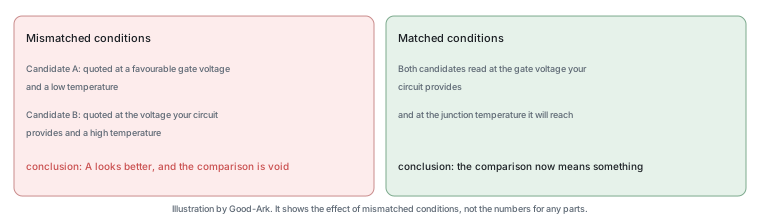
Comparing two datasheets looks like a reading task and is actually an arithmetic one. The work is not in understanding either document; it is in getting the two sets of numbers onto the same conditions so that a comparison means something. Most comparison mistakes happen before any numbers are compared.
Rule one: compare like with like
A parameter has many values, one for each set of conditions. Compare a forward voltage measured at one amp with a forward voltage measured at ten amps and you have learned nothing, whatever the result. Compare a current rating quoted at twenty-five degrees case temperature with one quoted at a hundred degrees and the comparison is worse than useless, because it will favour the part whose conditions were more flattering.
The analogy that fits is comparing the fuel consumption of two cars measured on different routes. Both numbers are honest and the comparison is meaningless. Datasheets are full of different routes, stated explicitly in a column that beginners tend to skip.
Building a comparison table
The mechanical approach solves most of the problem. Build a table with one row per parameter and one column per candidate, and put the conditions in the row label rather than beside each value. That forces you to state the conditions once, decide whether both candidates can be compared, and then fill in two numbers that are genuinely comparable.
Five or six rows carry most decisions. The parameter that limits the design electrically, the parameter that determines the loss, the package and its thermal behaviour, the temperature range, and availability. Adding more rows is usually refinement; leaving out the thermal row is usually a mistake.
| Parameter and condition | Candidate A | Candidate B | Which matters |
|---|---|---|---|
| Blocking voltage at the stated temperature | Whichever has margin for your transients | ||
| Forward voltage at your operating current | The one that determines your loss | ||
| Current rating at your case temperature | Only usable if you can hold that temperature | ||
| Thermal resistance for your mounting | Converts the loss into a junction temperature | ||
| Leakage at your rated voltage and temperature | Decides behaviour in the blocked state | ||
| Package and footprint | Decides whether it fits and how it cools |
The test-condition trap
Three conditions cause most false comparisons. The test current or voltage at which a value was measured. The case or ambient temperature attached to a rating. And the mounting or copper area assumed by a thermal figure. Each of those appears in a column next to the value, and each is the difference between a comparison and a coincidence.
The practical rule is to read the conditions first and the values second. If the conditions differ between the two candidates, either find the matching conditions in the curves or state explicitly that the comparison is limited. Both are legitimate; silently comparing mismatched numbers is not.
Typical versus guaranteed values
A datasheet may state a minimum, a maximum and a typical value for the same parameter, and only the first two are guarantees. A comparison built from two typical values compares two samples rather than two specifications, and the conclusion may not hold for the parts you receive.
The direction of the comparison matters too. A parameter where higher is better and a parameter where lower is better need different treatment, and a typical value sits in the middle of a distribution whose width you cannot see from the table. Where the two candidates are close on typical values, the guaranteed limits may separate them decisively in the opposite direction.
Graphs: read the axes first
When the two datasheets quote values at different conditions, the curves let you compare properly by reading both at your operating point. Three habits make that reliable: read the axes including units and whether either is logarithmic, identify which curve corresponds to your temperature rather than taking the first one, and find your operating current rather than comparing the shapes of the whole curves.
It is also worth reading the same graph in both documents whenever both contain it. The curve shape often reveals a difference the table hides — a device whose parameter degrades faster with temperature, or one whose behaviour becomes non-linear earlier — and those differences matter in a design that operates near a limit.
Where the datasheets disagree
When two documents give conflicting values for nominally the same parameter, three explanations are common. The conditions differ. The revisions differ, so one is describing an older specification. Or the parts genuinely differ, which happens when two devices share a registered number but were designed independently.
Each explanation has a different response. For conditions, match them. For revisions, find the current one from the manufacturer and use it. For genuinely different devices, treat the comparison as a design decision rather than a specification check, because you are choosing between two products rather than verifying a substitute.
Documenting your decision
Write the comparison down, with the conditions and the source revision for each value. That record answers the question a colleague or a future version of yourself will ask — why was this part chosen — and it also protects the decision if a supplier changes a revision later.
Three details make the record useful. The datasheet revision for each candidate. The conditions at which each value was read. And the parameter that actually decided the choice, which is often not the one with the largest difference.
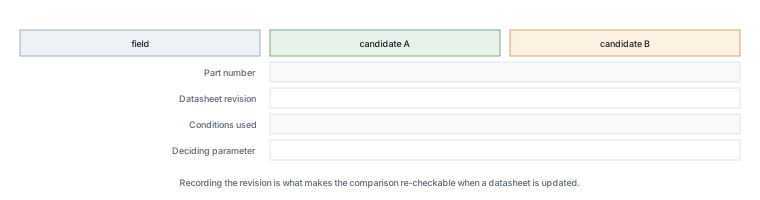
Two further habits make a comparison reliable in the long run. The first is to write the requirement down before reading either document, because a requirement read from a datasheet is not a requirement but a preference. The second is to record which parameter decided the choice, because that record is what allows a later reviewer to re-check the decision quickly instead of repeating the whole exercise.
It is also worth keeping the losing candidate in the record. A comparison that lists only the chosen part cannot be revisited, and the most common reason for revisiting is that the chosen part becomes unavailable. Knowing which alternative was rejected, and on which parameter, turns a re-sourcing exercise from a week of reading into an afternoon.
Two smaller habits complete the method. Read both documents’ revision histories before comparing values, because a recently tightened limit is a common reason two nominally equivalent parts differ. And keep a note of the source for each value you record, so that when a supplier later changes a document you can tell whether the change affects a figure your design depends on.
The comparison also has a stopping point. Once one candidate is clearly unsuitable on a parameter that cannot be traded, the remaining rows are wasted effort, and continuing to compare them creates the impression that the decision is closer than it is.
Printable template
- Write the circuit’s requirement for each parameter before reading either datasheet.
- Record the part number and datasheet revision for each candidate.
- Read the conditions for each value and put them in the row label.
- Fill in the values only where the conditions match.
- Where they do not match, use the curves or mark the row as inconclusive.
- Note whether each value is minimum, maximum or typical.
- Check the package and thermal row against your actual mounting.
- Record which parameter decided the choice, and why.
Background written for beginners covers datasheets and electronic components. The test methods that make two manufacturers’ numbers comparable come from JEDEC, thermal and assembly expectations from IPC, documentation control requirements from ISO, and sector-level context from the Semiconductor Industry Association. Document and standards background is published by NIST and IEC.
FAQ
How do I compare two datasheets quickly?
Decide your requirements first, then read only the rows that correspond to them. For most designs that is five or six parameters: the electrical limit, the loss parameter, the thermal behaviour, the package and the temperature range. Reading both documents end to end is slower and produces worse decisions, because it invites comparing whatever two numbers happen to be adjacent.
What is the single most common comparison error?
Comparing values quoted under different conditions. A forward voltage measured at a different current, an on-resistance at a different gate voltage, or a current rating at a different case temperature are not comparable, and the error usually favours whichever document stated the more flattering condition. Reading the conditions column before the value column prevents it.
Should I compare typical or guaranteed values?
Guaranteed values, for a design decision. Typical values describe what a sample usually measured and are useful for understanding behaviour, but they are not promises. Where two candidates are close on typical values, the guaranteed limits may separate them decisively, and possibly in the opposite direction to the typical comparison.
What if the two datasheets use different terminology for the same thing?
That is common, and it is why a glossary of terms is worth having. Two manufacturers may describe the same reverse voltage with different symbols, and the conditions attached will tell you whether they mean the same thing. Our glossary of datasheet terms maps the common abbreviations to the question each one answers.
Two of these questions seem to be about spreadsheets.
They are, and that is a naming coincidence rather than a mistake on your part. Comparing two columns or two data sets in a spreadsheet is a data task with its own tools, and it has nothing to do with comparing two component documents. This article is about the second kind; if your question is the first kind, a spreadsheet function will answer it better than an engineering article.
What to do next
Take two candidate parts for a design you are working on and build the comparison table before reading either datasheet properly. Writing the conditions into the row labels first forces the comparison to be honest, and it usually eliminates one of the candidates before you have read a page. The terms used in those rows are covered in our datasheet glossary.
Send Good-Ark the parameters and the conditions your circuit imposes, and we can supply the values at matching conditions so the comparison is like for like.
Email sales@goodark.com, or start from the product family learning centre.
This article is published by Good-Ark, a manufacturer of discrete semiconductor devices. It describes comparison practice rather than the values for any specific part; those belong to the current official datasheets.
Recommended
 Why Do Diodes Get Hot? Conduction and Switching Losses ExplainedInfoStandard, Fast Recovery, and Schottky Diodes: What’s the Difference?Info
 What Is a Fast Recovery Diode? Understanding “Fast Recovery”Info
 What Is a Diode? A Beginner’s Guide to How It WorksInfo
 Automotive Semiconductor Report 2026: Chips Per Car Keep RisingKnowledge