Why Do MOSFETs Get Hot? On-Resistance Explained Without the Maths
Why do MOSFETs get hot? A device is a resistance while it conducts and a lossy transition while it switches. Where the heat comes from, and the fix.
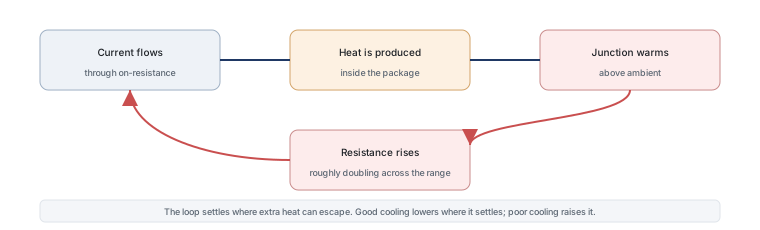
A MOSFET does not get hot because it is faulty. It gets hot because it is a resistance while it conducts and a lossy transition while it switches, and both of those produce heat in proportion to the current you push through it. The interesting part is that the heating tends to accelerate itself.
A switch that is never perfect
A mechanical switch closed by hand has a contact resistance measured in milliohms, so it produces almost no heat. A MOSFET when fully on behaves like a resistor of a specified value, and that value is large enough to matter: a part with an on-resistance of a few tens of milliohms carrying several amps produces watts of heat inside a package smaller than a fingernail.
The analogy that works is a pipe with a slightly rough interior. Water still flows, but the roughness converts some of the pressure into heat in the pipe wall. The roughness in a MOSFET is its on-resistance, and the amount of heat depends on the square of the flow: twice the current means four times the loss. That squaring is why current ratings are not the whole story and why a part that runs cool in one design can be hot in another with only a modest increase in current.
The resistance that makes heat
Two numbers convert current into heat. The first is the on-resistance, measured at a stated gate voltage and junction temperature, which is what the part actually presents in your circuit. The second is the thermal resistance from junction to ambient, which describes how easily that heat leaves. Multiply the loss by the thermal resistance and you have the temperature rise above ambient.
Written out, the arithmetic for a first estimate is three steps: current squared multiplied by on-resistance gives the power; power multiplied by thermal resistance gives the rise in degrees; ambient plus the rise gives the junction temperature, which is then compared against the device’s limit. None of that requires algebra beyond multiplication, and it is the calculation that separates a design that works from one that fails after a few months.
| Step | Example | What it tells you |
|---|---|---|
| Loss while conducting | 5 A through 20 milliohms gives about 0.5 W | The heat generated inside the package |
| Temperature rise | 0.5 W with 60 degrees per watt gives a 30 degree rise | How much hotter the junction is than the air |
| Junction temperature | 30 degrees of rise above 40 degrees ambient gives 70 degrees | What to compare against the device’s limit |
The numbers above are invented for the arithmetic. The thermal resistance figure is the one that varies most, because it depends on the package, the copper area under the part, the airflow and whether the enclosure is sealed. A datasheet value measured on a generous copper pad does not describe the same part soldered to a small pad in a closed box.
Why heat makes it worse
On-resistance rises with junction temperature. For silicon devices a rough rule is that the figure roughly doubles between room temperature and the top of the rated range, and the exact curve is on the datasheet as a normalised graph. That creates a feedback loop: current makes heat, heat raises resistance, higher resistance makes more heat at the same current.
Two consequences follow. The first is that a design must be checked at the hot figure, not the room-temperature one, because the room-temperature number is the best case the part will ever present. The second is that the loop does not run away in a well-designed circuit — it settles at a temperature where the extra heat can escape — but it settles higher than a first estimate predicts. That is why thermal estimates use the hot on-resistance and why a design that looks comfortable on paper can be marginal in practice.
Gate drive: the hidden cause
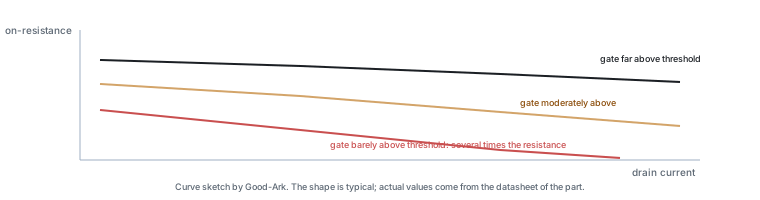
Of all the reasons a MOSFET runs hotter than expected, gate drive is the one that causes the most confusion, because a poorly driven part still works. If the gate voltage is below what the device needs to reach its rated on-resistance, the channel is only partly open and the effective resistance is far higher than the datasheet figure. The circuit functions, the current is correct, and the device is quietly dissipating several times the expected power.
This is why the on-resistance graph has more than one line: the curves are drawn at different gate voltages, and the one that applies is the one matching your driver. Reading the headline figure without checking the gate condition is the single most common thermal mistake in beginner designs, and it is also the easiest to avoid.
Switching losses in one paragraph
Conduction is only half the story. Every time the device changes state it passes through a moment where both voltage and current are present at once, and that moment produces a burst of loss. The burst is short but it repeats with every switching cycle, so a part switching a hundred thousand times a second accumulates a significant loss even if each transition is brief. Faster gate drive shortens the transition and reduces the loss, which is the other reason gate drive quality matters so much.
Does your project need a heatsink?
The answer follows from the junction temperature you calculated. If the estimate lands comfortably below the device’s limit with the thermal resistance of its actual mounting, no heatsink is needed. If it lands near the limit, the options are to reduce the loss, improve the thermal path, or both — and the arithmetic tells you which of those has room.
Two practical points are worth attaching to that. First, the thermal resistance of a small surface-mount part is dominated by the copper connected to it, so a few square centimetres of board can change the answer more than a heatsink bolted to a plastic package. Second, a sealed enclosure raises the ambient the part sees, which adds directly to the junction temperature and is the reason a design that passes on an open bench can fail in a closed box.
Five ways to cool it down
In rough order of effectiveness and cost, the options are these. Choose a part with lower on-resistance, which reduces the heat at the source and is usually the cheapest fix if the design is not yet frozen. Drive the gate properly so the device reaches the resistance you specified. Add copper to the drain or source pad, which lowers the path to the board. Improve the path from the board to the air, whether by ventilation, a heatsink or a thermally connected enclosure. And reduce the current or the duty cycle if the application allows it.
What does not work is fitting a larger package without changing the copper area or the drive, because it improves a step in the thermal chain that was not the limiting one.
Quick self-check
- Estimate the conduction loss: current squared multiplied by the hot on-resistance.
- Find the thermal resistance for your actual mounting, not the datasheet’s best case.
- Multiply to get the rise, and add the ambient inside your enclosure.
- Compare against the device’s maximum junction temperature, with margin.
- Check the gate voltage against the curve you used for on-resistance.
Our own articles cover thermal management in electronics and MOSFET. Device test methods come from JEDEC, thermal and assembly expectations from IPC, and sector-level context from the Semiconductor Industry Association. Device and quality background is published by ISO, NIST and IEC.
FAQ
What causes a MOSFET to burn out?
In thermal terms, the junction temperature exceeded what the package could sustain. That can happen through too much current, through inadequate cooling, through a gate voltage too low to open the channel properly, through excessive switching frequency, or through a combination. The destruction is usually fast, but the conditions that caused it developed over the design rather than at the moment of failure.
How does temperature affect a MOSFET?
It raises the on-resistance, which increases the loss at the same current, and it increases leakage. The resistance effect is the one that matters in most designs and is shown on the datasheet as a normalised curve against junction temperature. Because the effect compounds, thermal estimates must use the hot figure rather than the room-temperature one, which is typically the best case the part will ever offer.
What kills MOSFETs?
Gate overvoltage is the fastest route, because the oxide layer is a few nanometres thick. After that come overheating, avalanche events beyond the rating, and shoot-through in bridge circuits. The general treatment is in our article on what a MOSFET is; this article concentrates on the thermal mechanism.
What is the lifespan of a MOSFET?
It has no wearing part, so there is no fixed life in the way a relay contact has one. What limits it is thermal cycling: repeated heating and cooling stresses the joints between the die, the package and the board, and enough cycles will eventually open one of them. A device held at a steady moderate temperature lasts far longer than one driven through large temperature swings, which is an argument for designing with thermal margin rather than for meeting the limit.
Is a warm MOSFET normal?
Yes, provided the junction temperature is inside its rating. Any device carrying current dissipates power, and that power leaves as heat. What is worth investigating is a device that is too hot to touch briefly, one that runs much hotter than an identical part beside it, or one whose temperature has risen over time — the last of those usually indicates that the thermal path has degraded or the load current has increased.
What to do next
Take the hottest MOSFET in a circuit you own or have built and run the five-point self-check on it. The estimate will not be exact, but it will tell you whether the design has margin or is living on the edge, and that is the difference between a product and a prototype. The part-selection side of the same subject is in our article on choosing a MOSFET for a first project.
Give Good-Ark the current, the switching frequency, the gate drive voltage and the mounting, and we can point to the package and family that carry the dissipation with margin.
Email sales@goodark.com, or start from the product family learning centre.
This article is published by Good-Ark, a manufacturer of MOSFETs and other discrete devices. The example figures are invented round numbers used to show the arithmetic; thermal resistance depends on package, copper area, airflow and enclosure.
Recommended
 Why Does Your Phone Charger Get Warm?Knowledge
 Energy Efficiency Rules Worldwide: How Regulations Shape Component ChoicesKnowledge
 Wide-Bandgap Semiconductors: Adoption Report 2026Knowledge
 The GaN Charger Market: Why Your Next Adapter Is SmallerKnowledge
 Component Lead Times in 2026: What Is Actually Normal NowKnowledge
 China’s Power Semiconductor Industry: Where It Stands in 2026Knowledge