Why You Should Not Trust Every Datasheet PDF You Find Online
Fake datasheet warning: files get edited, pages get lost and version numbers invented. How to spot it, and what to do when a copy is all you have.
Updated: October 27, 2026
Do not trust every datasheet PDF you find online—prefer manufacturer repositories, matching revisions, and consistent marking drawings.
Related reading: how to read a diode datasheet, datasheet terms explained, why not to trust every datasheet.
| Item | Verify | Typical trap |
|---|---|---|
| Conditions | Tj, IF, VR columns | Comparing numbers at different conditions |
| Curves vs tables | Which one your bias uses | Using only the cover headline |
| Absolute max | Never design at ABSMAX | No margin for spikes |
| Revision | Document date / PCN | Old PDF from a reseller |
Where these files come from
Four origins account for most of the documents circulating online. The manufacturer publishes the original. A distributor copies it to accompany a listing, usually faithfully. An aggregator indexes it along with thousands of others, often stripping the context that made it identifiable. And a seller produces or edits a version to accompany a part they are offering, which is where the problems concentrate.
The analogy that fits is photocopying. The first copy is indistinguishable from the original, and after several generations of copying, re-scanning and occasional deliberate editing, the document is still recognisable and no longer reliable. What makes the datasheet case worse than a photocopy is that a single changed digit produces a plausible-looking specification that will be believed.
Signs of an edited sheet
Editing leaves traces, and four are worth looking for. Typography that changes mid-table, because an edited value rarely matches the font, size or alignment of the original. A table whose column widths no longer align with its headings, which happens when a row is replaced rather than regenerated. A graph whose curve contradicts the table beside it, because the table was edited and the graph was not. And a footer or header whose version differs from the one on the cover page.
None of those is proof on its own. Together they make a document worth verifying rather than using, and verification is usually quick: find the same document on the manufacturer’s own site and compare the page that concerned you.
Version numbers that do not exist
A document circulating with a revision identifier can be checked against the manufacturer’s publication record, and occasionally the identifier does not appear anywhere else. That is a strong signal, because a revision is issued once and referenced consistently; a version that exists only on one website was probably created there.
Two related patterns are worth knowing. A document with no revision identifier at all cannot be compared against anything, so its currency is unknowable. And a document whose revision identifier is plausible but whose contents match an older published version suggests a file that has been relabelled rather than updated.
Missing pages and orphaned graphs
Aggregators and sellers sometimes publish partial documents, and a partial document is more dangerous than an obviously incomplete one. Missing pages are easy to notice if the numbering jumps, and easy to miss if the file has been re-paginated. Orphaned graphs are subtler: a curve that appears without the axes label it referred to on the page it came from, or a table whose units were defined in a note that is no longer present.
The practical check is to confirm that the document contains the sections a complete datasheet should have: identity, absolute maximum ratings, electrical characteristics, curves, package drawing, ordering information and revision history. A file missing one of those is either partial or not a datasheet.
| Sign | What it suggests | Check |
|---|---|---|
| Typography changes mid-table | A value was replaced after publication | Compare the page against the manufacturer’s copy |
| Graph contradicts the table | The table was edited and the graph was not | Read the graph at the table’s conditions |
| Revision identifier found nowhere else | The file was relabelled | Search the identifier on the manufacturer’s site |
| No revision identifier at all | Currency is unknowable | Replace it with a documented version |
| Missing expected sections | The document is partial | Count the sections a datasheet should contain |
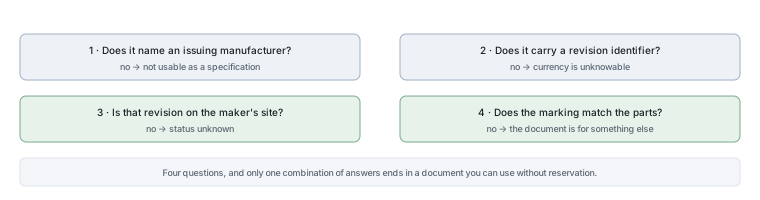
| No issuing manufacturer named | Nobody is accountable for the contents | Do not use it for a specification at all |
How to trace a document to its owner
Tracing is simpler than it sounds, and it takes about two minutes. Read the first page and find the issuing manufacturer, the part number and the revision. Then visit the manufacturer’s own site, find the family page for that part number, and check whether the document there matches the one you have — same revision identifier, same page count, same values on the page that concerned you. For a step-by-step approach to the document itself, see How to Read a Diode Datasheet for the First Time.
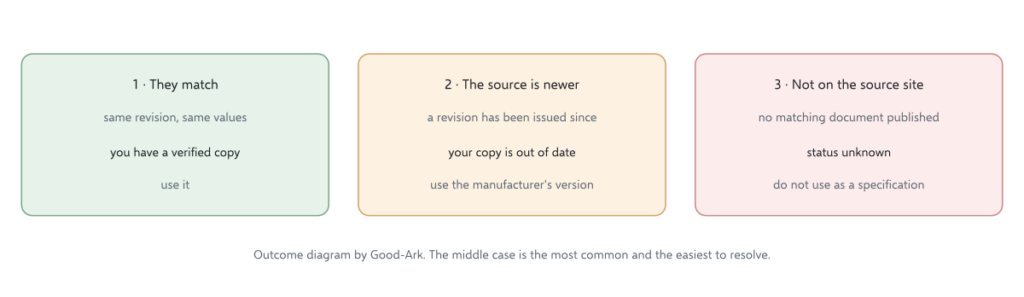
Three outcomes are possible. The documents match, in which case you have a verified copy. The manufacturer’s version is newer, in which case you should use theirs. Or the document is not on the manufacturer’s site at all, in which case you have something else — possibly an older revision, possibly a different product’s document, possibly an edited file — and it should not be used as a specification. Where the documents disagree, the product family learning center is a sensible place to look for family documentation to compare.
What to do if you only have a copy
Sometimes the copy is genuinely all that exists — the part is obsolete, the manufacturer has been acquired, or the document is no longer published. In that case three rules make the situation workable. Treat the document as evidence of what the part probably is rather than as a specification. Verify the parameters that matter by measurement where you can. And record clearly that the document is unverified, so that nobody downstream treats it as authoritative.
What you should not do is write the values into a design that ships. An unverified document with a plausible number is precisely the situation this article exists to prevent, and the cost of the alternative — asking the supplier, or measuring the part — is small compared with a production failure.
When to ask the supplier directly
Asking is normal and takes about a day. A request should name the complete orderable part number, the package, and the specific parameters you need, and it should ask for the document revision rather than just the document. That framing makes the request easy to answer and produces something citable.
A supplier who cannot provide a document for the part they are selling has told you something useful about their supply chain, whether or not their parts are genuine. In an authorised chain, the document is part of the product.
There is one more reason to treat a copy with care, and it is about consequences rather than about forgery. A design decision made from an unverified document is difficult to defend later, because there is nothing to point at when the question is asked. Keeping the verified version, and recording when it was verified, turns that conversation into a short one.
Two further internal references make the checks easier to apply. Comparing the verified document against a candidate is covered in comparing two datasheets, and the physical checks that go with the paperwork are in confirming a part number is real.
Checklist
- Find the issuing manufacturer and the revision on the first page.
- Check that the document has all the sections a datasheet should contain.
- Look for typography, alignment or graph-versus-table inconsistencies.
- Compare the revision against the manufacturer’s own published version.
- If it is not published there, treat the document as unverified.
- Measure the parameters that matter for an unverified part.
- Ask the supplier for the document and its revision in writing.
- Record the verification status wherever the document is filed.
The related reading on this site covers datasheets and the PDF format. Document control requirements come from ISO, component test methods from JEDEC, marking and traceability expectations from IPC, and sector-level context from the Semiconductor Industry Association. Document and standards background is published by NIST and IEC.
Verification checklist
- Download from the official source when possible; record the revision.
- Recompute loss at your hot temperature, not only 25 °C.
- Treat marketplace PDFs without revision control as untrusted.
FAQ
Why do two PDFs for the same MPN disagree?
Revisions, region-specific docs, or altered reseller copies. Prefer the manufacturer repository.
What is the first datasheet section to read?
Absolute maximum ratings and the conditions footnotes—then the electrical table at your temperature.
Are part-number decoders reliable?
They are hints only. Family codes collide across vendors; the datasheet wins.
How does heating relate to datasheet limits?
See why diodes get hot and the thermal design guide.
Continue through this engineering topic
- Good Ark Datasheets Finding Official Documents And Verifying
- How To Read A Diode Datasheet
- Common Diode Part Numbers
- Datasheet Terms Explained
- Diode Markings Decoded
- Documents With A Component Order
- Good-Ark Product Lookup Hub
Topic hub: How to read a diode datasheet — related selection guides and application notes in this cluster.