Protecting USB Ports From Static: A Beginner’s Guide
Protecting USB ports from static: why the data lines are the fragile part, where the protection component goes, and the layout mistakes to avoid.
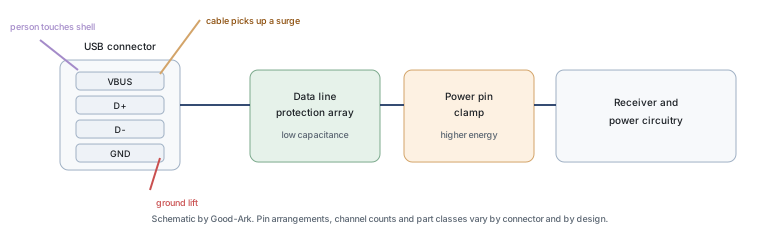
A USB port is a hole in the enclosure with four conductors behind it, one of which is a direct connection to a power rail and two of which go straight into a high-speed receiver. That combination makes the connector the single most exposed point on most consumer devices, and it is why the protection components next to it are often the smallest parts on the board.
Last updated:
Why USB ports are vulnerable
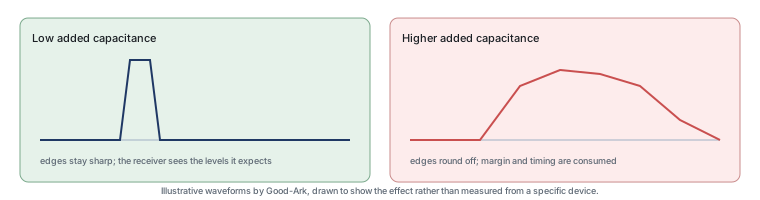
Three properties combine. The connector is metal and exposed, so a charged person touching it is a normal event rather than an accident. The pins are close together, so a discharge between two of them is as likely as a discharge to earth. And the data lines carry signals at frequencies where a small amount of added capacitance matters, which limits how much protection can be added without breaking the link.
The power pin is less delicate in voltage terms but exposed to a different risk: a cable that has picked up a surge. The ground pin is the reference everything else is measured against, and a discharge that lifts the ground momentarily is felt by every device on the board. So the port is not one problem, it is three, sharing one connector.
What a spark does to the data lines
A static discharge delivers a short burst of current. Where it enters a cable, the current divides between the conductors according to their impedance at those frequencies, and at nanosecond timescales that is governed by inductance and by the parasitic capacitance of the traces. The path through a high-speed receiver is not the lowest-impedance route, but it is not negligible, and when it becomes the dominant route the receiver sees a voltage far above its supply.
The damage is not always immediate. A discharge can degrade the thin oxide at a receiver input without destroying it, and the port keeps working with a reduced margin until a later event finishes the job. This is the mechanism behind the familiar pattern of a port that fails weeks after an incident nobody linked to it.
Where the protection part goes
The rule is the same as for any boundary: the protective device belongs between the connector and everything else, as close to the pins as the layout allows, with a short and wide return to the ground pin. The practical constraint on a USB design is that the traces are already differential pairs with controlled impedance, so the protection has to be placed without breaking the pair routing or adding stubs.
This is where most hobby-level failures happen. A part placed at the far end of the board, or connected with a thin trace that loops away and back, gives the discharge a longer, more inductive path than the one through the receiver. The protection is present, correctly rated and ineffective.
There is one more placement rule that is specific to connectors: protect before the connector’s own wiring, not after it. On a board-mount connector the pins are the boundary, and any trace that runs from the pins to a distant protection device is itself the exposed antenna. The same logic applies inside a product that has a short internal cable between the connector and the board — the protective device belongs at the connector end, where the event arrives, rather than at the board end where the event has already travelled.
One part per line or one part for all
Below about a handful of lines, the choice is between discrete devices and an array. Discrete parts give freedom of placement and let you choose capacitance per line, which matters when one line is much faster than another. An array puts several channels in one package, saves board area and keeps the channels matched, at the cost of constraining where each channel can be routed.
| Consideration | Discrete protection | Array |
|---|---|---|
| Placement freedom | Each part can sit exactly where it is needed | Fixed by the package outline |
| Board area | More parts, more footprints | One footprint for several lines |
| Channel matching | Depends on layout, not on the parts | Channels sit in identical conditions |
| Mixed-speed lines | Choose capacitance per line | One capacitance figure for all channels |
| Routing constraint | Traces can run as the impedance requires | Every protected line has to reach the package |
| Cost for one or two ports | Lower, because you buy only what you use | Better value once several lines are involved |
Choosing a part for a hobby board
Four lines of the datasheet do the work. The working voltage has to be above the highest voltage on that line, including the normal tolerance of the supply. The capacitance has to be low enough that the interface still closes its margins, which for a fast pair is the binding constraint. The clamping behaviour at the pulse current you expect tells you what the receiver will see. And the package has to fit the space you have, which on a hand-soldered board usually means something you can actually place.
Prices here are low enough that the wrong decision is rarely expensive in components and often expensive in time. Buying a handful of candidates and testing the interface with each in place is a reasonable strategy for a hobby project, and it teaches more about the trade-off than reading specifications alone.
Three external references help when comparing parts. The interface itself is described under USB, and the event under electrostatic discharge. The pulse test methods behind published protection ratings come from the International Electrotechnical Commission and JEDEC; board assembly expectations are covered by IPC; and sector-level material by the Semiconductor Industry Association. Standards and measurement background is published by NIST and ISO.
Common layout mistakes
The mistakes repeat, and all of them are about the path rather than the part.
- A long stub to the protection device. The discharge takes the stub, then reflects; the receiver sees the result.
- A thin return. The ground path carries the same current as the signal path, and a narrow trace adds impedance that appears as voltage across the very node being protected.
- Placing protection after a connector’s internal wiring. The exposed path is inside the connector, so the part must be at the pins, not downstream of them.
- Protecting the data lines and ignoring the power pin. Cable-borne events arrive on the power conductor, which is where the energy is largest.
- Forgetting the shield or shell. On a metal-shell connector, the shell is often the first thing a hand touches and should have a defined, short path to the enclosure ground.
Testing your protection
You cannot reproduce a real ESD event with a bench supply, so the practical tests are indirect. Check that the interface still meets its specification with the protection fitted — that is the failure mode you are most likely to create. Check that the part is where you intended and that its return is short by measuring continuity from the connector pin to the device and to ground. And if you have access to a proper ESD test setup, test at the connector, because that is where the event will actually occur.
What you should not do is assume that a fitted part means a protected port. The most common field failures in this area come from protection that was present, correctly specified and wrongly placed.
FAQ
Do USB data blockers really work?
They do the specific thing they claim: a data blocker with only power and ground connected physically interrupts the data lines, so nothing can be transferred over the cable. That is a different purpose from surge protection, and a data blocker is not a substitute for it. If the concern is a public charging point, a blocker addresses data; if the concern is electrical stress, the protection has to be designed into the device.
What cancels static electricity?
Nothing cancels it; charge can only be drained or equalised. Practically, that means giving the charge a slow, controlled path to ground rather than letting it discharge through electronics — a grounded dissipative mat, a wrist strap with a series resistor, or simply touching a grounded metal surface before handling equipment. Humidifying a dry room reduces how much charge builds in the first place, which is often easier than draining it afterwards.
Is ESD damage permanent?
When a gate oxide is punctured, yes — the damage is physical and the device does not recover. When the event causes a temporary upset, such as a receiver misreading or a device resetting, the effect ends with the event. The difficult case is latent damage, where the device still functions but with less margin; that is permanent as well, and it is the reason a port can fail weeks after an incident that appeared to cause no problem.
How to reduce USB interference?
Interference and ESD protection are related but different problems. For interference, the usual measures are keeping the differential pair matched and close, avoiding stubs, providing a continuous reference plane under the pair, and filtering the power pin. Adding a protection device can worsen interference if its capacitance is too high for the data rate, so the two requirements have to be considered together rather than sequentially.
Do I need protection on every USB port?
Yes, if the port is externally accessible, because the exposure is identical for each one and a user will not know which port is protected. In a multi-port product the protection is often implemented as arrays serving several connectors, but the electrical requirement is the same for each: a short path from the pins, a defined return, and a part whose capacitance the interface can tolerate.
What to do next
On your next board with a USB connector, place the protection before you route the pair, and check the return path with the same care you give the signal. If you want to understand the capacitance trade-off more deeply, the article on low-capacitance protection on signal pins covers it, and the wider protection picture is in the product family learning centre.
Tell Good-Ark the connector type, the data rate and the voltage on each line, and we can point to the protection family and package that fits without breaking the interface.
Email sales@goodark.com, or start from the ESD protection diode example.
This article is published by Good-Ark, a manufacturer of ESD protection devices. It describes how to read a protection specification rather than prescribing one; capacitance, clamping and package values must come from the current official datasheet of the part you select.
Continue through this engineering topic
For the complete selection, design, verification, and troubleshooting path, explore the TVS ESD and Surge Protection Hub.
- Practical guide: Clamping Voltage Explained: The Datasheet Number That Decides Protection
- Practical guide: How Does a Surge Protector Work? (And When It Quietly Stops Working)
- Practical guide: Lightning, Surges and Home Electronics: Where Protection Actually Sits
- Ask Good-Ark technical support about this application
Recommended
 Why Do Diodes Get Hot? Conduction and Switching Losses ExplainedInfoStandard, Fast Recovery, and Schottky Diodes: What’s the Difference?Info
 What Is a Fast Recovery Diode? Understanding “Fast Recovery”Info
 What Is a Diode? A Beginner’s Guide to How It WorksInfo
 Automotive Semiconductor Report 2026: Chips Per Car Keep RisingKnowledge