ESD Protection for Beginners: Why a Tiny Diode Saves Your Phone
ESD protection for beginners: the smallest part on a phone board can decide whether a static shock ends in a reset or a repair, and how to choose one.
The smallest part on a phone circuit board is often a protection diode, a few tenths of a millimetre across, and it exists because the connector next to it is a doorway. Anything a user touches is a place where a static discharge can enter, and the protection part decides whether that discharge ends as an annoyance or as a repair.
Last updated:
Where static comes from in real life
Charge builds whenever two materials touch and separate, which in daily use means walking across a floor, sliding a phone out of a pocket, or pulling a synthetic jacket over a shirt. The charge collects on your body, and because dry air drains it slowly, the voltage can reach several kilovolts without you noticing anything at all.
The discharge happens when you touch something that offers a path away. On a phone that is usually the connector shell, a metal frame or a plug. The event is extremely brief — tens of nanoseconds — but the current is concentrated into a path the circuit was never designed to carry, and it is that concentration rather than the total energy that damages silicon.
Why the protection part is so small
Protection devices sit on signal lines, and a signal line cares about what is attached to it. A protection diode adds capacitance in parallel with the data pair, and capacitance slows edges. On a fast interface that is enough to round off the waveform and close the margin the receiver needs, so the part has to be small not because the event is small but because the line is delicate.
Think of it as a narrow side door on a wide corridor. The door has to be wide enough for the intruder (the surge) and narrow enough not to disturb the traffic (the signal). That is the entire design tension of an ESD part, and it is why a big robust diode is not a better answer than a small fast one.
The path a spike wants to take
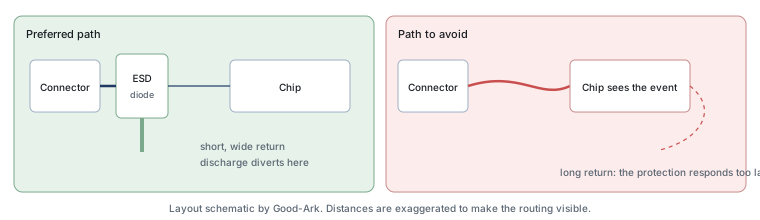
Current follows the path of least impedance, and at nanosecond timescales impedance is dominated by inductance rather than resistance. That single fact explains most protection failures. When a discharge enters a connector, it will travel to whatever offers the shortest electrical loop back to its source, and if that path runs through the chip rather than through the protection diode, the chip is what gets stressed.
So the design goal is not simply to add a protection part; it is to make the protection path more attractive than the path through the circuit. That means placing the diode adjacent to the connector, arranging a return path that is short and wide, and avoiding any route where the discharge has to travel past the chip before it reaches ground.
What “low capacitance” means for speed
Capacitance is the part of a component that stores charge, and on a signal line it acts as a small load that has to be charged and discharged with every transition. The higher the capacitance, the longer each edge takes, and the more the signal is rounded. On a slow line — a button, a sensor, a power rail — that is irrelevant. On a high-speed data pair it is decisive.
The practical rule is to read two numbers from the datasheet rather than one. The first is the capacitance at the signal conditions you will use, since it varies with voltage. The second is the clamping behaviour at the pulse current you expect. A part that is excellent on one and poor on the other is not a protected design, it is a design with a new problem.
The parts near a phone connector
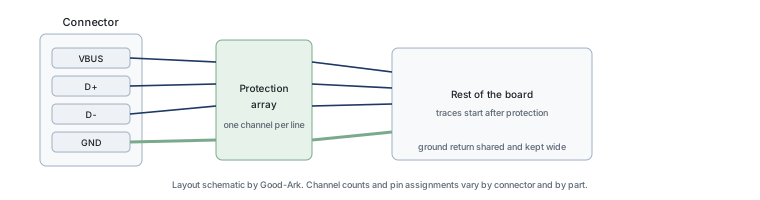
Around a modern connector you will usually find three things. A protection array, which is one package covering several lines at once and saves board space. A shunt to ground that is placed as close to the pins as the layout allows. And often a small series element whose job is to limit current rather than to clamp voltage, working together with the shunt.
The combination matters because protection is a system, not a component. The same diode placed two millimetres differently will protect a port, fail to protect it, or disturb the signal — which is why protection parts are specified with a suggested layout as well as a set of electrical ratings.
What you can and cannot fix yourself
On a phone, almost nothing about ESD protection is repairable at home, and it is worth being direct about that. The devices are smaller than a grain of salt, they are under shields, and the board is not designed to be reworked. Adding protection to an existing phone is not a realistic project.
What is realistic is doing it correctly on your own board. If you are laying out a small interface — a USB connector on a hobby project, a sensor header, a motor driver — you can choose a part, place it at the connector, give it a short return and check that the signal still works. That is the same decision a phone designer makes, at a scale you can handle.
Three external references are useful when comparing parts. The general explanation of electrostatic discharge covers the event itself, the USB interface entry explains why the data lines are the delicate part of a connector, and the pulse test methods behind protection ratings come from the International Electrotechnical Commission and JEDEC. Board assembly expectations are covered by IPC, and sector-level material by the Semiconductor Industry Association. Standards and measurement background is published by NIST and ISO.
Shopping for ESD parts
Prices for these devices are low and quantities are large, which produces both an advantage and a hazard: they are cheap enough to buy in small quantities from anywhere, and cheap enough to be counterfeited or mislabeled with little at stake for the seller. The practical approach is to buy from a distributor with a stated manufacturer relationship, and to check the datasheet revision against the part you receive.
When comparing candidates, four lines decide most of it: the working voltage of the line you are protecting, the capacitance, the clamping voltage at the pulse current you expect, and the package that fits your layout. Part numbers within one family often differ only in voltage class or channel count, so reading the ordering table is more useful than reading the marketing summary.
| Interface you are protecting | The decisive parameter | The one that is easy to ignore |
|---|---|---|
| USB data pair | Capacitance, because the line is fast | Channel count and how the array is laid out internally |
| USB power pin | Working voltage above the supply with tolerance | Surge capability, since this pin also sees cable events |
| Button or sensor input | Working voltage and leakage | That the added capacitance is harmless on a slow line |
| Audio or analog signal | Leakage and linearity | Capacitance, because it can filter the signal you are measuring |
| Motor or actuator driver | Energy handling; the line is electrically noisy | Repetition, since this event happens every cycle, not once |
FAQ
How to do ESD protection?
Start from the boundary. Identify every point where a person or a cable can reach the circuit, choose a protection device for each line that crosses that boundary, place it as close to the entrance as the layout allows, and give it a short, wide return path. Then verify that the signal still meets its specification with the protection in place, because a part that clamps correctly and ruins the data rate has not solved the problem. The layout principle is illustrated in the article on board-level ESD protection.
What are the four ESD protection recommendations for preventing ESD?
The four that cover most of the ground are: protect at the boundary rather than inside the circuit; keep the protection device and its return path close to the entry point; choose a part whose capacitance the signal can tolerate; and control charge generation and handling in the environment where the board is built. The first three are design decisions, the fourth is a process decision, and a product needs all four — a perfect layout will not save a board that was handled badly.
What are the precautions to be taken to protect ESD?
For handling: work on a grounded dissipative surface, wear a wrist strap with a built-in resistor, keep devices in their packaging until use, and raise humidity or use ionisers where dry air is a problem. For design: place protection at connectors, avoid long unprotected traces that run past sensitive devices, and make sure the return path is part of the layout review rather than an afterthought. For verification: test at the pin level, not only at the board level.
What should you wear to avoid electrostatic discharge?
At a bench, a proper antistatic wrist strap with a series resistor, and clothing that does not generate charge readily — synthetic fleece and some wool blends are worse than cotton. Footwear grounded through a dissipative floor or heel strap is standard in production areas. What you should not do is wear an ordinary metal watch or a plain conductive band and treat it as protection, because on a live circuit a low-resistance path through your body is a hazard.
Do I need ESD protection on a hobby project?
If the connector is exposed and someone can touch it — especially in dry conditions — it is worth adding, because the part is inexpensive and the routing cost is a few millimetres of board. The benefit is not only surviving a discharge; it is also that the pin stops being a path into the chip for an event you did not plan for. A low-capacitance part on a USB pair is a good first exercise.
What to do next
The next time you lay out a connector, draw the protection path before you draw the rest of the circuit, and check that it is the shortest route to ground. If you want the physics behind why the path matters, the piece on low-capacitance protection on signal pins goes further into the trade-off.
Tell Good-Ark the interface type, its voltage and the capacitance budget, and we can point to the protection family and package that fits.
Email sales@goodark.com, or start from the product family learning centre.
This article is published by Good-Ark, a manufacturer of ESD protection devices. Capacitance, clamping and package values must be taken from the current official datasheet of the part you select; nothing in this article is a specification.
Continue through this engineering topic
For the complete selection, design, verification, and troubleshooting path, explore the TVS ESD and Surge Protection Hub.
- Practical guide: Protection Diodes: TVS, Reverse Polarity, Flyback and Input Clamps
- Practical guide: TVS vs Zener Diode: Two Similar Parts With Two Very Different Jobs
- Practical guide: Good-Ark TVS Diodes in Plain Language: The Shock Absorbers of Your Circuit
- Ask Good-Ark technical support about this application
Recommended
 Why Do Diodes Get Hot? Conduction and Switching Losses ExplainedInfoStandard, Fast Recovery, and Schottky Diodes: What’s the Difference?Info
 What Is a Fast Recovery Diode? Understanding “Fast Recovery”Info
 What Is a Diode? A Beginner’s Guide to How It WorksInfo
 Automotive Semiconductor Report 2026: Chips Per Car Keep RisingKnowledge