Why Does Your Phone Charger Get Warm?
Why does my phone charger get warm? Warm is normal because no converter is perfectly efficient. Where the heat comes from, and when to act on it.
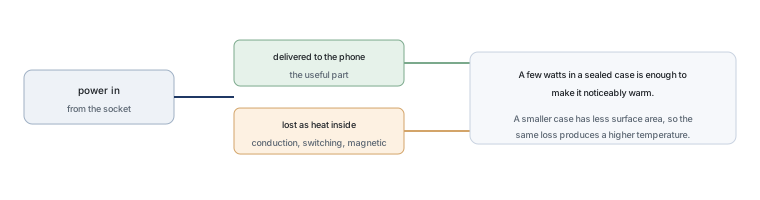
A charger gets warm because converting electricity from one voltage to another always loses some of it, and the lost energy has to go somewhere. In a small adapter most of that energy becomes heat inside the case. The warmth itself is normal. What matters is how much of it there is and where it is concentrated: a case that feels pleasantly warm after an hour is doing what it should, and a case that is painful to touch, smells of hot plastic or buzzes is not.
Warm is normal, hot is not
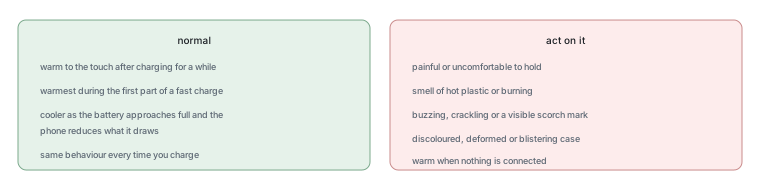
The practical test is your hand, not a thermometer, because the relevant limit is about whether the surface is tolerable in normal use. A charger that is warm to the touch after charging a phone for an hour is behaving normally. One that is uncomfortable to hold after a few minutes, or that stays hot when nothing is connected, is worth investigating.
It helps to know what normal looks like for the power level. A small adapter pushing a large amount of power into a nearly empty battery works hardest at the beginning of a charge and then eases off, so the warmest moment is usually in the first part of the cycle. After that, the charger should cool down while the phone finishes filling, because the phone reduces what it draws as the battery fills.
What happens inside the little box
Inside a modern charger there are three main parts. A rectifier stage turns the alternating current from the socket into direct current. A switching stage chops that direct current thousands of times a second and feeds it through a small transformer, which is what separates the mains side from the low-voltage side. And a control circuit watches the output and adjusts the switching so that the voltage and current match what the device asked for.
Each of those stages loses a little energy, and the losses are not all the same kind. Conduction loss happens because current passing through a component meets resistance, and it rises with the square of the current, which is why a charger working harder gets disproportionately warmer. Switching loss happens every time a transistor changes state, and it rises with how often that happens. Magnetic loss happens in the transformer, and it also rises with frequency. A designer’s job is to balance those three so that the case stays within its limits while the adapter stays small.
| Source | Why it happens | What increases it |
|---|---|---|
| Conduction loss | Current passing through resistance in components and joints | Higher current, which rises with the square of the load |
| Switching loss | Energy lost each time a transistor changes state | Higher switching frequency and faster switching edges |
| Magnetic loss | Energy lost in the transformer core and windings | Frequency, flux level and core material |
| Resistance in cables and connectors | Poor contact or thin conductors in the path | Worn cables, bent pins, loose plugs |
Where the wasted energy goes
If a charger delivers 20 W to a phone and its efficiency is 85 per cent, then roughly 23.5 W went in and about 3.5 W became heat inside the case. The arithmetic matters because it shows the scale: a few watts inside a sealed plastic box with no fan is enough to make it noticeably warm, and a small box has less surface area to lose that heat from than a large one does. Compact chargers run warmer than bulky ones for the same reason a small room gets stuffy faster.
Those numbers are an illustration of the method rather than a measurement of any particular charger, because efficiency depends on the load, the input voltage and the design. The direction is what generalises: the harder a charger works, the more heat it produces, and the smaller the case, the higher the temperature that heat produces.
Fast charging makes more heat
Fast charging raises the power the adapter delivers, and more power means more loss at the same efficiency. Two mechanisms make it worse than a simple increase. First, the current rises, and conduction loss rises with the square of current. Second, a warmer component is usually a less efficient one, so the loss increases slightly as the temperature rises, which is a mild self-reinforcing effect that a designer counters with thermal design rather than with a better specification.
The other half of the story is in the phone, not the charger. A modern device negotiates how much power to accept, and it reduces that figure when the battery is warm or nearly full, because charging a lithium battery hard at high temperature damages it. So a charger that feels hot because the phone asked for maximum power is doing its job, and the negotiation is why the heat falls off later in the cycle.
When you should worry
Four signs are worth acting on: a case that is painful to hold, any smell of hot plastic or a burning odour, an audible buzzing or crackling, and discolouration, deformation or scorch marks on the case or the cable. A charger that has any of those should be unplugged and replaced rather than monitored.
A fifth sign is less alarming but still informative: a charger that stays warm when nothing is connected. That indicates standby consumption higher than it should be, and while it is unlikely to be dangerous, it is a sign of a design or a fault that will also waste electricity continuously.
Safety habits that actually matter
Five habits reduce the temperature of a charger in normal use, and none of them requires any tooling. Charge on a hard, open surface rather than on a bed, a sofa or a cushion, because soft materials insulate the case. Avoid stacking a charger under a laptop or behind furniture. Use a cable that fits properly and is not frayed, because a poor contact adds resistance exactly where the current is highest. Unplug the charger when it is not needed if it stays warm with nothing attached. And use a certified adapter rather than an uncertified copy, because certification is the evidence that the insulation, spacing and protection requirements were tested.
One habit is worth giving up. Opening a charger to look inside is not a repair activity, for two reasons. The mains side carries a voltage that can be fatal, and the capacitors on that side can hold a dangerous charge after the unit is unplugged, sometimes for a period measured in minutes. A charger that misbehaves should be replaced, not investigated.
How to measure the temperature yourself
If a charger feels warmer than you expect, the honest way to check it is with a non-contact infrared thermometer, which measures the surface temperature without touching anything. Point it at the middle of the case and at the cable near the connector, note the reading after the charger has been working for some minutes, and repeat at a moment when the phone is nearly full to see how much it falls. That gives you a comparison rather than an impression.
Two cautions apply. A surface reading is not the temperature of the components inside, which is higher, and the relevant limits for a product come from the safety standard that applies to its category rather than from a number found online. The purpose of measuring is to establish what is normal for your charger, so that a change from one week to the next becomes visible.
FAQ
Is it normal for a charger plug to get hot?
Warm is normal and hot is not. Converting voltage always loses some energy, and in a small sealed case that energy warms the surface. A plug that is comfortably warm after a charging session is working as designed. One that is painful to hold, or that smells of hot plastic, is not.
How do I stop my charger from getting hot?
Give it air and reduce what it has to do. Charge on a hard open surface, keep it out of soft furnishings and away from other warm equipment, use an undamaged cable with a firm fit, unplug it when unused if it stays warm, and avoid charging while running a demanding application if you do not need to. Those measures lower the temperature by removing the conditions that raise it.
Can an overheated charger cause a fire?
A charger that is damaged, that has been crushed, that contains a poor connection or that was built without the required insulation and protection is a genuine risk, which is why certification marks matter. A normal charger operating at a surface temperature that is merely warm is not the same thing. The signs to act on are heat that is painful, a burning smell, buzzing, or any discolouration of the case or cable.
What should I do if my charger is burning hot?
Unplug it from the socket first, then from the device, and let it cool somewhere non-flammable. Do not keep using it to see whether it does it again, and do not open it, because the mains-side capacitors can hold a dangerous charge after the unit is disconnected. Replace the charger and, if a cable was involved, replace that too.
Does a warm charger damage my phone?
Not through the charger’s own temperature, because the phone manages what it accepts and reduces charging when the battery is warm. The bigger thermal risk to a battery comes from charging in a hot place, such as a car in the sun or under a pillow, rather than from the adapter’s case being warm. Keeping both the phone and the charger ventilated is the practical measure.
What to do next
Feel the charger during the hottest part of a charge and again when the phone is nearly full. If it follows the pattern in Figure 2, there is nothing to fix. If it does not, replace it and keep the receipt, because the interesting question afterwards is which component failed. How a converter turns mains power into the low voltage a phone uses is explained in our guided tour of a power adapter, and the rectifier side of it is in USB-PD charger rectifier design.
Background is available in our overviews of battery chargers, USB, switched-mode power supplies and electronic components, safety standards from IEC, and energy programmes from the US Department of Energy. Efficiency and safety background is published by NIST, ISO, the Semiconductor Industry Association and JEDEC.
Tell Good-Ark the power level, the load profile and the space inside the case, and we will confirm which rectifiers and protection devices suit the design.
Email sales@goodark.com, or start from the application design centre.
This article is published by Good-Ark, a manufacturer of discrete semiconductor devices used in power supplies. It gives no specific temperature limit, because the applicable values belong to the safety standard for the product category, and it does not advise opening a mains-powered product.
Recommended
 Energy Efficiency Rules Worldwide: How Regulations Shape Component ChoicesKnowledge
 Wide-Bandgap Semiconductors: Adoption Report 2026Knowledge
 The GaN Charger Market: Why Your Next Adapter Is SmallerKnowledge
 Component Lead Times in 2026: What Is Actually Normal NowKnowledge
 China’s Power Semiconductor Industry: Where It Stands in 2026KnowledgeHow to Read a Diode Datasheet: Key Parameters for BeginnersInfo