Why You Should Not Trust Every Datasheet PDF You Find Online
Fake datasheet warning: files get edited, pages get lost and version numbers invented. How to spot it, and what to do when a copy is all you have.
A wrong datasheet is more dangerous than a missing one, because it produces confidence rather than caution. The failure modes are mundane: a file edited by a seller, a page that never made it into the scan, a version number that only exists on one website. None of them looks suspicious, and all of them are detectable.
Where these files come from
Four origins account for most of the documents circulating online. The manufacturer publishes the original. A distributor copies it to accompany a listing, usually faithfully. An aggregator indexes it along with thousands of others, often stripping the context that made it identifiable. And a seller produces or edits a version to accompany a part they are offering, which is where the problems concentrate.
The analogy that fits is photocopying. The first copy is indistinguishable from the original, and after several generations of copying, re-scanning and occasional deliberate editing, the document is still recognisable and no longer reliable. What makes the datasheet case worse than a photocopy is that a single changed digit produces a plausible-looking specification that will be believed.
Signs of an edited sheet
Editing leaves traces, and four are worth looking for. Typography that changes mid-table, because an edited value rarely matches the font, size or alignment of the original. A table whose column widths no longer align with its headings, which happens when a row is replaced rather than regenerated. A graph whose curve contradicts the table beside it, because the table was edited and the graph was not. And a footer or header whose version differs from the one on the cover page.
None of those is proof on its own. Together they make a document worth verifying rather than using, and verification is usually quick: find the same document on the manufacturer’s own site and compare the page that concerned you.
Version numbers that do not exist
A document circulating with a revision identifier can be checked against the manufacturer’s publication record, and occasionally the identifier does not appear anywhere else. That is a strong signal, because a revision is issued once and referenced consistently; a version that exists only on one website was probably created there.
Two related patterns are worth knowing. A document with no revision identifier at all cannot be compared against anything, so its currency is unknowable. And a document whose revision identifier is plausible but whose contents match an older published version suggests a file that has been relabelled rather than updated.
Missing pages and orphaned graphs
Aggregators and sellers sometimes publish partial documents, and a partial document is more dangerous than an obviously incomplete one. Missing pages are easy to notice if the numbering jumps, and easy to miss if the file has been re-paginated. Orphaned graphs are subtler: a curve that appears without the axes label it referred to on the page it came from, or a table whose units were defined in a note that is no longer present.
The practical check is to confirm that the document contains the sections a complete datasheet should have: identity, absolute maximum ratings, electrical characteristics, curves, package drawing, ordering information and revision history. A file missing one of those is either partial or not a datasheet.
| Sign | What it suggests | Check |
|---|---|---|
| Typography changes mid-table | A value was replaced after publication | Compare the page against the manufacturer’s copy |
| Graph contradicts the table | The table was edited and the graph was not | Read the graph at the table’s conditions |
| Revision identifier found nowhere else | The file was relabelled | Search the identifier on the manufacturer’s site |
| No revision identifier at all | Currency is unknowable | Replace it with a documented version |
| Missing expected sections | The document is partial | Count the sections a datasheet should contain |
| No issuing manufacturer named | Nobody is accountable for the contents | Do not use it for a specification at all |
How to trace a document to its owner
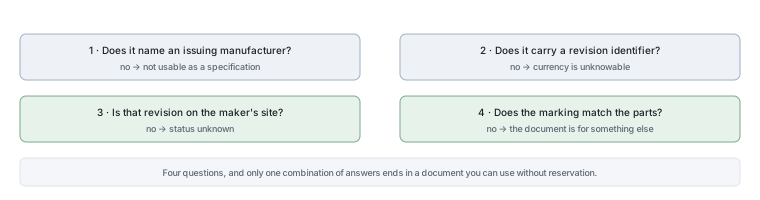
Tracing is simpler than it sounds, and it takes about two minutes. Read the first page and find the issuing manufacturer, the part number and the revision. Then visit the manufacturer’s own site, find the family page for that part number, and check whether the document there matches the one you have — same revision identifier, same page count, same values on the page that concerned you.
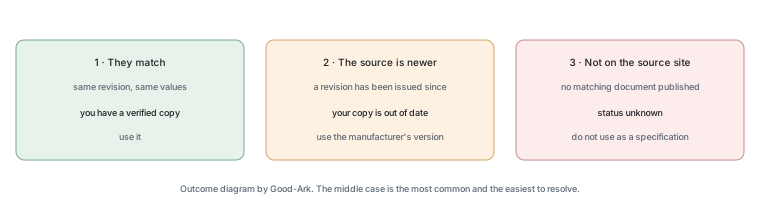
Three outcomes are possible. The documents match, in which case you have a verified copy. The manufacturer’s version is newer, in which case you should use theirs. Or the document is not on the manufacturer’s site at all, in which case you have something else — possibly an older revision, possibly a different product’s document, possibly an edited file — and it should not be used as a specification.
What to do if you only have a copy
Sometimes the copy is genuinely all that exists — the part is obsolete, the manufacturer has been acquired, or the document is no longer published. In that case three rules make the situation workable. Treat the document as evidence of what the part probably is rather than as a specification. Verify the parameters that matter by measurement where you can. And record clearly that the document is unverified, so that nobody downstream treats it as authoritative.
What you should not do is write the values into a design that ships. An unverified document with a plausible number is precisely the situation this article exists to prevent, and the cost of the alternative — asking the supplier, or measuring the part — is small compared with a production failure.
When to ask the supplier directly
Asking is normal and takes about a day. A request should name the complete orderable part number, the package, and the specific parameters you need, and it should ask for the document revision rather than just the document. That framing makes the request easy to answer and produces something citable.
A supplier who cannot provide a document for the part they are selling has told you something useful about their supply chain, whether or not their parts are genuine. In an authorised chain, the document is part of the product.
There is one more reason to treat a copy with care, and it is about consequences rather than about forgery. A design decision made from an unverified document is difficult to defend later, because there is nothing to point at when the question is asked. Keeping the verified version, and recording when it was verified, turns that conversation into a short one.
Two further internal references make the checks easier to apply. Comparing the verified document against a candidate is covered in comparing two datasheets, and the physical checks that go with the paperwork are in confirming a part number is real.
Checklist
- Find the issuing manufacturer and the revision on the first page.
- Check that the document has all the sections a datasheet should contain.
- Look for typography, alignment or graph-versus-table inconsistencies.
- Compare the revision against the manufacturer’s own published version.
- If it is not published there, treat the document as unverified.
- Measure the parameters that matter for an unverified part.
- Ask the supplier for the document and its revision in writing.
- Record the verification status wherever the document is filed.
The related reading on this site covers datasheets and the PDF format. Document control requirements come from ISO, component test methods from JEDEC, marking and traceability expectations from IPC, and sector-level context from the Semiconductor Industry Association. Document and standards background is published by NIST and IEC.
FAQ
How can a PDF datasheet be wrong?
For three ordinary reasons. It may be an old revision that has since been superseded, so the values are genuine but no longer current. It may be a partial copy missing the page or note that defined a value’s units or conditions. Or it may have been edited, which usually happens when a seller adjusts a specification to match the parts they are offering. Only the third involves intent; all three produce the same risk.
Are datasheet aggregator sites safe to use?
They are useful for finding a starting point and unreliable as a final source, because the file’s origin is often untraceable and the index can mismatch documents and part numbers. The practical approach is to search wherever you like and then download and verify from the manufacturer’s own site. That gives you a search engine’s reach with an original document’s authority.
What if the manufacturer no longer publishes the document?
Then the document’s status is unverified and it should be treated as evidence rather than as a specification. Verify by measurement the parameters your circuit depends on, record that the document is unverified, and avoid using the values in anything that ships. Where the part is obsolete, the manufacturer’s end-of-life notice is usually the better source, because it names the suggested replacement.
Does a genuine-looking logo on a PDF prove anything?
It proves that someone had access to the logo, which is not difficult. What is harder to fake consistently is a complete document: correct typography throughout, graphs that agree with tables, a revision identifier that appears in the manufacturer’s own publication record, and an ordering table that matches the family’s other documents. Verification is a comparison of the whole document rather than a check for a mark.
Is an edited datasheet a sign of counterfeit parts?
It is a sign that somebody wanted a specification to look different from what the manufacturer published, which is a warning rather than a proof. The parts may be genuine and the document adjusted for another reason, or the document may be accurate for a different revision. Either way the correct response is to obtain the manufacturer’s version and check the parts against it, rather than to accept the edited copy.
What to do next
Take a datasheet you downloaded recently and check whether its revision appears on the manufacturer’s own site. That single check takes two minutes and either validates the document or tells you something you needed to know. The steps for finding an authoritative version are in our guide to finding official datasheets.
Send Good-Ark the part number, the revision identifier and the page that concerns you, and we can confirm whether it matches the published version.
Email sales@goodark.com, or start from the datasheet verification guide.
This article is published by Good-Ark, a manufacturer of discrete semiconductor devices. It describes document risks in general terms and makes no claim about any specific website, file or seller.
Recommended
 Why Do Diodes Get Hot? Conduction and Switching Losses ExplainedInfoStandard, Fast Recovery, and Schottky Diodes: What’s the Difference?Info
 What Is a Fast Recovery Diode? Understanding “Fast Recovery”Info
 What Is a Diode? A Beginner’s Guide to How It WorksInfo
 Automotive Semiconductor Report 2026: Chips Per Car Keep RisingKnowledge